NetFusion Designs logo
Heart icon
Support
Email
info@nfd.ca
Phone
647-476-5259(Canada)
IT Services
Icon dropdown arrow

Infrastructure Implementation

Project PlanningHardware Voice over IP (VoIP)Application DevelopmentCloud DesktopSecurity Cameras

Managed IT Services

IT Support24/7 HelpDeskCyber Security & AntivirusData Backups & Disaster
Recovery
Co-Managed ITComplianceEmergency Ransomware
Recovery
Penetration & Vulnerability
Assessment

Optimization of Processes

Microsoft 365 OptimizationVirtual CIO ServicesPenetration TestingInventory Lifecycle
Management
Transforming SMEs with AI
Industries
Icon dropdown arrow
Dental Managed IT Services
Construction
Hotels & Hospitality
Franchises
Financial & Insurance Services
Government
Health Care & PharmaceuticalLegal & Professional Services
Local Small & Medium Businesses
Manufacturing
Non-profit
Real Estate
Retail
Transportation & Logistics
Enterprise & Consulting
Publicly Traded Companies
Our Story
Icon dropdown arrow
About UsTestimonials
Partners
Sponsorship
BlogContact Us
Open menuClose menu
Icon chevron up
Browse Blog:
Business
Insight
Advice
Insight

Secure IP Cameras for Business: A Practical Guide

Secure IP Cameras for Business: A Practical Guide

A secure business IP camera system has three parts that work together: cameras and a recorder that suit the job, a network configuration that keeps outsiders out, and a clear privacy purpose you can defend to employees and regulators. Get all three right and the cameras protect your premises. Get the second one wrong and the cameras become a way into your network.

This guide walks through each part in plain language, for owners and managers who need to decide what to buy, how to set it up and who should look after it.

NetFusion Designs Inc
Keep Cameras From Becoming Network Risks
NetFusion Designs provides managed IT services, including security and monitoring, to help businesses protect the networks their cameras use.
Explore managed IT services

TL;DR

  • An IP camera sends video over your network. That makes it a networked device, so it needs the same care as a laptop or server: unique passwords, updates, and its own network segment.
  • Choose professional-grade cameras from a vendor that still issues security updates. Avoid end-of-life models and consumer kits.
  • Decide where footage is stored (on-site recorder, cloud or a mix) based on bandwidth, uptime and who needs remote access.
  • Write down why you are recording before you buy. In Ontario, employers with 25 or more employees on January 1 also need a written electronic monitoring policy.
  • Ask every installer for an itemized quote and a named owner for ongoing patching.

Table of Contents

  • What an IP camera is, and what “wireless” really means
  • Choosing cameras and recording for your site
  • How cameras get compromised, and how to prevent it
  • Vet the vendor before you vet the camera
  • Privacy: decide your purpose before you install
  • What affects the cost, and how to read a quote
  • Perspective: a camera system is an IT system
  • Where NetFusion Designs fits
  • A short checklist before you go live
  • FAQ
  • Sources

What an IP camera is, and what “wireless” really means

An IP camera is a digital camera that sends video across a network using the internet protocol. Older analogue CCTV runs coaxial cable to a dedicated recorder. IP cameras connect through standard network cabling or Wi-Fi, and a recorder or cloud service stores the video.

Two terms cause confusion:

  • Wireless (Wi-Fi) cameras connect to your wireless network. They still need power, and signal quality depends on your Wi-Fi.
  • PoE cameras get power and data over a single Ethernet cable. Power over Ethernet is the usual choice for business installations because there is one cable to run and no separate power supply at each camera.

In a business setting, a network video recorder (NVR) records IP cameras that connect by Ethernet, and PoE can carry power and data on one cable. A digital video recorder (DVR) is the older model for analogue cameras on coaxial cable, and it can make sense where a building already has that cabling.

For security, a wired PoE camera has one advantage: it does not depend on a Wi-Fi password that dozens of other devices share. It still needs hardening, covered below.

Choosing cameras and recording for your site

Start with what each camera has to do. A camera meant to give you an overview of a room is a different purchase from one meant to identify a face at a door or read a licence plate at a gate. Define that goal first, then pick hardware.

Camera types

Type Best for Watch out for
Dome Offices, reception, retail floors Wide view, less detail at distance
Bullet Perimeters, parking lots, loading docks Needs weatherproof rating and a good mount
Turret Entrances and corridors with adjustable angle Check night performance
Fisheye 360-degree indoor views of open areas Image needs dewarping to read details
PTZ Large yards and lots, where one camera pans and zooms Covers one area at a time
Licence-plate Vehicle gates and entrances Needs correct angle and lighting

These categories are standard across commercial camera types. For outdoor locations, look at the ingress protection rating. Placement matters as much as the model, and we cover it in our guide to business security camera placement.

Where the footage lives

There are three common designs:

  1. On-premise NVR. Video records to a box in your building. You control it, and it keeps working if the internet drops. Someone has to maintain it and protect it physically.
  2. Cloud recording. Video is stored with a hosted service. Remote access is easy, but you need enough upload bandwidth and you must understand where the data is held.
  3. Hybrid. Cameras or a local recorder store footage, and selected clips or events are copied to the cloud. This design is often chosen by retail and logistics businesses to balance bandwidth, uptime and remote access.

The recorder’s channel count sets how many cameras it can support, and common sizes are 8, 16 and 32 channels. Buy with growth in mind. Adding a ninth camera to an eight-channel recorder means replacing the recorder.

Storage is its own calculation: number of cameras, resolution, frame rate and how many days you keep footage all drive disk size. We explain the arithmetic in our article on security camera storage requirements. Agree on a retention period that matches your business need, not whatever the default setting happens to be.

Where the footage lives — overview diagram

How cameras get compromised, and how to prevent it

A camera is a small computer on your network. If it has a weak password, an old firmware version or an open remote-access port, someone can view the feed or use the device as a foothold. Industrial security guidance describes compromised CCTV cameras as potential entry points into connected networks, and recommends network segmentation and continuous monitoring.

The ONVIF standards body, which publishes interoperability standards for IP security products, sets out a broad approach in its cybersecurity best practices covering network security, device hardening, user access, maintenance and physical access. In practice, that translates to this checklist.

Network

  • Put cameras on their own VLAN. A VLAN is a separate virtual network. If a camera is compromised, the attacker lands in a segment with no route to your file server or accounting system.
  • Do not expose cameras directly to the internet. Remote viewing should go through a VPN or a vendor service with proper authentication, not a forwarded port.
  • Disable services you do not use. Every enabled feature is something to patch and defend.

Devices

  • Change default credentials on day one. Use a strong, unique password for every device, stored in a password manager.
  • Use encrypted connections. HTTPS is recommended, and industrial guidance calls for TLS 1.2 or newer for communications and stored data.
  • Patch firmware on a schedule. Cameras do not update themselves the way phones do. Someone has to own that task.

People

  • Give each user only the access they need. The receptionist does not need to export footage. Role-based access control limits who can view live video, play back recordings and change settings.
  • Remove accounts when staff leave. Shared logins make this impossible, so avoid them.
  • Protect the recorder physically. A locked room or cabinet matters. Anyone who can unplug a box can delete your evidence.

Vet the vendor before you vet the camera

The most secure camera on the day of purchase becomes a liability if the manufacturer stops issuing fixes. The UK’s National Protective Security Authority advises businesses to confirm that products are not end-of-life and that the manufacturer provides regular security updates. Supply chain security is part of product selection, so you also need to know whether a vendor will keep supporting what it sells.

Before you sign, ask:

  1. How long will this model receive firmware updates?
  2. How are vulnerabilities reported and how fast are patches released?
  3. Does the system support role-based access and encrypted connections out of the box?
  4. Who patches it after installation, and how often?
  5. What happens to remote access if the vendor’s cloud service changes or closes?

Professional-grade commercial systems are also the better choice over consumer kits when footage may be needed for an insurance claim or by police. Image quality, low-light performance and reliable time stamps all affect whether it is usable.

Privacy: decide your purpose before you install

Cameras that record people are collecting personal information. Privacy rules vary across Canada, so apply the federal and provincial rules that fit your business and location. The sound approach is the same everywhere: define a specific purpose, tell people they are being recorded, collect no more than you need, protect the footage and keep cameras away from private areas such as washrooms and change rooms.

“Just in case” is a weak purpose. A defensible one names the problem: theft from a stockroom, safety at a loading dock, vandalism in a parking lot. The federal privacy regulator treats hidden recording as extremely privacy-invasive and appropriate only in the most limited cases, so use visible cameras with signage.
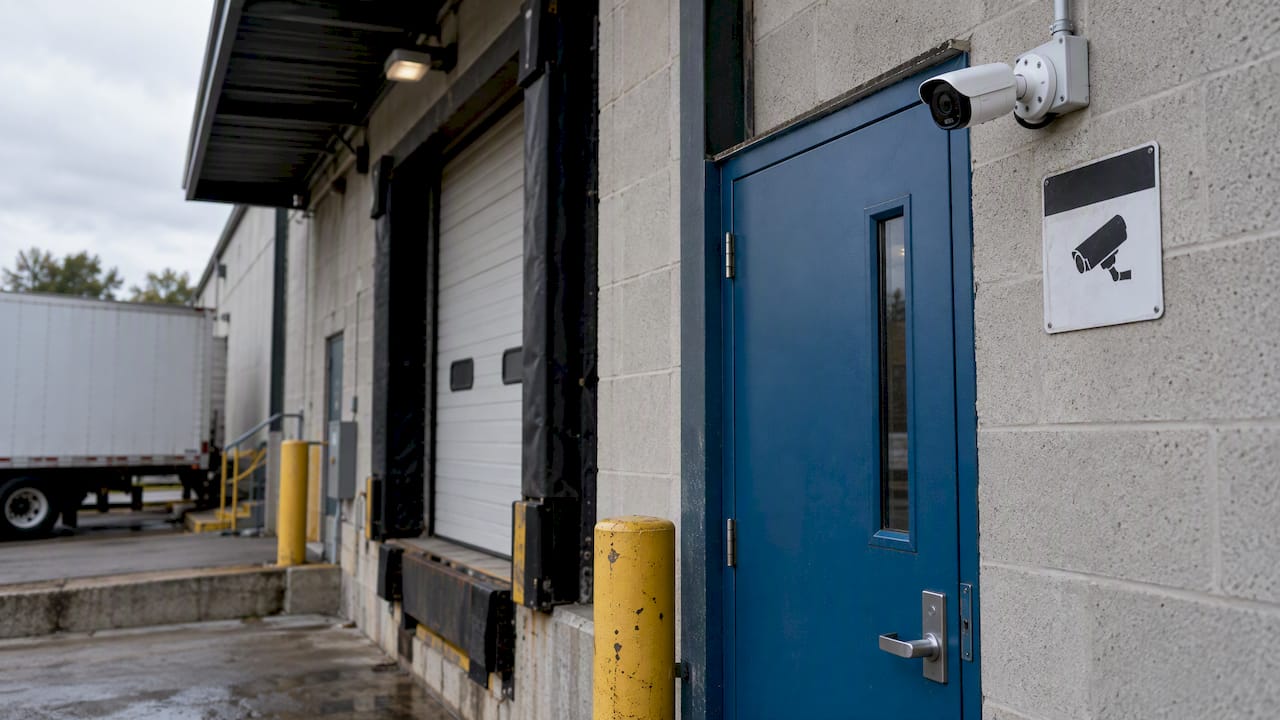
Visible IP camera above a loading dock

In Ontario, employers with 25 or more employees on January 1 must have a written electronic monitoring policy. It must describe how and in what circumstances the employer monitors employees, and the purposes for which the information may be used. Check the same page for how the rule applies to your headcount and how often the policy must be updated.

For a fuller treatment, read our guides to workplace video surveillance laws in Canada and our PIPEDA compliance checklist. If your business handles patient or client records, such as a dental clinic or an accounting practice, camera footage near those areas needs the same care as the records. Our IT compliance support in Ontario covers how those obligations fit together.

What affects the cost, and how to read a quote

We do not publish a fixed price for camera projects, because the price depends on the site. These are the factors that move it:

  • Number and capability of cameras. Resolution, night performance, zoom and analytics all change unit price.
  • Cabling. Running Ethernet through finished ceilings, concrete or across a yard costs more than a simple office.
  • Recorder and storage. More cameras and longer retention need larger disk arrays.
  • Cloud services and monitoring. Hosted storage and any alert monitoring are usually recurring costs.
  • Access and labour. Lifts, ladders, after-hours work and multiple floors add time.

A low camera price can be poor value if cabling, storage, configuration, remote viewing, warranty or support are left out. Ask for a quote that lists equipment, cabling, labour, licences, warranty and support separately, so you can compare like with like. Include security work on that list: VLAN setup, password management and a patching plan should be line items, not afterthoughts.

Also ask about recurring fees. A system with local recording and no subscription has a different cost profile from one tied to a cloud plan, and neither is automatically better. The right one is the one that matches your uptime, bandwidth and access needs.

Perspective: a camera system is an IT system

We see camera projects handled in two separate worlds: the facilities or security vendor who mounts the hardware, and the IT team or provider who runs the network. The gap between them is where problems start. Nobody owns the firmware, the cameras sit on the same network as the point-of-sale or the file server, and the admin password is on a sticky note by the recorder.

Our view is simple. If a device has an IP address, it belongs in your IT inventory, your patching schedule and your monitoring. That is the same discipline we apply to laptops, servers and Microsoft 365. It is why we put cameras on separate network segments, restrict who can see and export footage, and keep a record of what is installed and when it was last updated.

It also changes how we think about the provider relationship. A business with one provider for IT, cybersecurity and cameras has one team accountable for the whole picture, with no third-party vendor management for you to coordinate. For manufacturers with several buildings, that matters even more, and our multi-site network design guide and manufacturing cybersecurity practices show how we approach it.

One last point on purpose. The best privacy position is not the highest-resolution camera. It is a camera pointed at the thing you need to protect, kept for as long as you need and no longer, and viewed only by people who have a reason to.

— Geeshan

Where NetFusion Designs fits

We offer next-gen IP security cameras as part of our managed services, so camera security sits alongside the rest of your IT. Our 24/7 team, backed by a SOC 2 Type II certification, monitors the environment, and our cybersecurity services include managed anti-virus with EDR and 24/7 SOC and MDR. If you already have cameras and want them reviewed, or you are planning a new install, talk to us about managed IT services. We serve small and mid-sized businesses across Ontario and Canada, with teams in Kitchener-Waterloo, Toronto, Markham, Mississauga, Montréal and Winnipeg.

A short checklist before you go live

  1. Write the purpose for each camera and the retention period.
  2. Draft your notice signage and, if you have 25 or more employees, your electronic monitoring policy.
  3. Choose professional-grade cameras from a vendor with a clear update commitment.
  4. Create a dedicated VLAN and block direct internet exposure.
  5. Replace every default password and set up role-based accounts.
  6. Enable encrypted connections on cameras and recorder.
  7. Record each device in your asset list and schedule firmware reviews.
  8. Lock the recorder in a controlled space and back up critical footage.
  9. Test playback and export before the installer leaves.
  10. Review access accounts and firmware every quarter.

FAQ

Which security camera is least likely to be hacked?

No model is immune, so the setup matters more than the brand. Pick a professional-grade camera from a vendor that still issues security updates, then change default passwords, use encrypted connections, keep cameras on their own VLAN and patch firmware on a schedule. A camera that is never updated becomes the weak point over time.

What is the difference between a wireless camera and a Wi-Fi camera?

In everyday use they mean the same thing: a camera that connects to your network over Wi-Fi. The real contrast is with a PoE camera, which connects by Ethernet cable and gets power through the same cable. For business sites, PoE is usually more reliable and avoids sharing a Wi-Fi password.

Do I need a recorder, or can I use cloud storage only?

Both work. An on-site recorder keeps working if the internet is down and gives you control of the data. Cloud storage makes remote access easier but depends on bandwidth. Many businesses use a hybrid design, with local recording and selected footage copied to the cloud.

Do Ontario businesses need a policy for workplace cameras?

If you had 25 or more employees on January 1, Ontario requires a written policy on electronic monitoring. It must describe how and when you monitor employees and what the information may be used for. Even smaller employers should document their purpose, signage and retention period.

Sources

  • Written policy on electronic monitoring of employees, Government of Ontario
  • ONVIF Recommendations for Cybersecurity Best Practices for IP-Based Physical Security Products
  • Network Connected Security Technologies (NCST) Guidance, NPSA
  • Guidance on Covert Video Surveillance in the Private Sector, Office of the Privacy Commissioner of Canada
  • Eyes Wide Open: Securing Industrial CCTV in a Threat-Rich Landscape, Eaton
  • Commercial video surveillance and business security cameras, Avigilon
  • Commercial security cameras for businesses guide, Panopticon

Recommended

  • Camera Network VLAN Setup
  • Business Security Camera Placement
  • Security Camera Storage Requirements
  • Workplace Video Surveillance Laws Canada

Continue Reading

How Often Should a Business Replace Computers?
Email Encryption for Law Firms: A Practical Canadian Guide
Camera Network VLAN Setup: A Practical Guide for Businesses
E911 Requirements in Canada for Business Phone Systems
NetFusion Designs logo
NetFusion Designs is a globally recognized IT service provider and services clients across North America.

We hold a SOC 2 Type 2 report, and maintain internal processes and procedures that keep our clients’ data secure and confidential.
NetFusion Designs IT support team

IT Services Near Me

BurlingtonOakvilleHamiltonMississaugaMiltonBramptonEtobicokeBrantfordGuelphKitchenerWaterlooCambridgeSt CatharinesTorontoMarkhamCaledonNewmarketNorth YorkPickering & DurhamLondonMontreal

Services

Project PlanningHardwareTelephony & VoIPApplication DevelopmentCloud DesktopSecurity CamerasHelpdesk & SupportCyber Security & Anti-VirusData Backups & Disaster RecoveryMicrosoft 365 OptimizationVirtual CIO ServicesPenetration TestingPricingSchedule a MeetingRemote Support
Pricing

Pages

Free Security ScanAbout UsOur Migration ApproachWork CultureOur Core ValuesCode of ConductTestimonialsContactBlogSchedule a MeetingRemote Support

TORONTO

Bank capital office building law
401 Bay St, 16th Floor, Toronto Ontario
Email
info@nfd.ca
Phone
647-476-5259 (Canada)

MARKHAM

Bank capital office building law
141 Main Street N, Markham, ON L3P 1Y2
Email
info@nfd.ca
Phone
647-476-5259 (Canada)

TRI-CITY AREA
(Kitchener / Waterloo / Cambridge)

Bank capital office building law
22 Frederick St, Suite 700, Kitchener Ontario
Email
info@nfd.ca
Phone
647-476-5259 (Canada)

PEEL REGION

Bank capital office building law
6700 Century Ave, 3rd floor, Mississauga, ON L5N 1V8
Email
info@nfd.ca
Phone
647-476-5259 (Canada)

DURHAM REGION

Bank capital office building law
1315 Pickering Parkway, Pickering, ON L1V 7G5
Email
info@nfd.ca

MONTREAL

Bank capital office building law
8815 Av du Parc #402, Montréal, QC H2N 1Y7
Email
info@nfd.ca
Phone
647-476-5259 (Canada)

Special Offers

Radio station signal antena tower
Pricing: $100–185 per user
Icon chevron right
Terms and ConditionsPrivacy PolicyCookie Policy
© 2026 NetFusion Designs Inc.
LinkedInFacebookAlignable logo